
All posts in category "AndroBlip"
The beta quick & dirty: because of reasons, Androblip is being rebuilt. So there’s now a beta-program. This post is about that, check out that linked post for more info about how to join etc.
Beta 3.1.9
There was a request to add the ‘new comments’ icon back into the app. I’m not completely convinced it’s working perfectly, but as it is, the icon appears in the menu bar when the notification-code has found a new comment. There is also an added check when you load a view, so you get more regular updates when you’re actually in the app.
You can also now choose to keep comments unread when you open the recent comments dialog, or to mark them as unread. The last is the default behaviour by the way.
Finally some updates to commenting (adding the ‘add comment’ field twice for instance) have been added. See the complete list of scribbles I wrote about it in the AndroBlip public Trello board.
Now the wait is for the google play store, even more then normally. I can’t seem to upload the apk at the moment, but I’m sure it’ll work later tonight.
The beta quick & dirty: because of reasons, Androblip is being rebuilt. So there’s now a beta-program. This post is about that, check out that linked post for more info about how to join etc.
Beta 3.1.8
Previous beta I was ignoring a bug that has had at least some love this time around! The orientation issue (rotate the device and see an error) should be fixed, although it proves to be a tricky one. Then we have 2 new features: one would be subscriptions: you can subscribe and unsubscribe to a journal. The other is full-member only: you can favourite entries within the blipfoto limits (not sure, but I think you can favourite up to 3 entries per day).
Currently there is nothing on my immediate to-do: there are obviously some things that need fixing, design/layout love and stuff like that, but nothing has yet gotten priority. So ‘holler’ if you want something fixed :)
The beta quick & dirty: because of reasons, Androblip is being rebuilt. So there’s now a beta-program. This post is about that, check out that linked post for more info about how to join etc.
Beta 3.1.7
While there is a nasty bug I have been ignoring for some time going around (hint: you probably don’t want to change orientation that much :) ), I figured that could be ignored a bit longer in favour of this piece of feature-requesting (thanks by the way)
One thing I’d love is to move the ‘subscription’ view closer to the start, I find myself having to flick through the views every time i open it to see the people that I actually care about.
– Shane
That was bugging me as well, so that will be fixed. This was harder then it looked, but this was a great starting point:
The problem is that the longclick isn’t very intuitive for many users, including some powerusers. For 100% of my alpha-tester it wasn’t very clear what was supposed to be happening (thanks Ilse), meaning that it clearly was a problem.
So I wanted to just move stuff around on the first touch, but sadly the code I have doesn’t quite translate to that very easily. Moving some of the onItemLongClickListener code to the onTouchListeners helped though, but it’s still a bit of a hack. On the other hand, it does like it works good enough, especially for beta testing, so there we are!
The beta quick & dirty: because of reasons, Androblip is being rebuilt. So there’s now a beta-program. This post is about that, check out that linked post for more info about how to join etc.
Beta 3.1.5
There was a minor bug in the notifications, they were sneakily showing HTML codes. They shouldn’t, and if all’s well they don’t anymore. Also added a setting to choose the update-frequency for checking new comments. As always, the update is pushed to the market and should trickle down to your device soon.
The beta quick & dirty: because of reasons Androblip is being rebuilt. So there’s now a beta-program. This post is about that, check out that linked post for more info about how to join etc.
So apart from the update I pushed yesterday (see here), another quick update: I’ve re-established the 2-step upload: while you add your title and description, the image is uploaded in the background, so the wait is less. Which is good.
It might be annoying for a user not wishing to add a description, so you have to wait a bit, and then perform another action (press the button) instead of clicking it directly after selecting the shot. If there is need, it’s not a big issue to make it a setting, but as it stands I think that might be too much hassle for most users?
3.1.3 is in the market, expect it sometime in the next couple of hours!
Talking with one of the testers (hi Osmo!) about the source, I started thinking on how to proceed with some stuff. Basically, his question was, and I somewhat agree, why I don’t just open-source it. Now, there is always some sort of code-shyness involved with that, where you have to show the world what sort of mess you made late night, just after missing the Balmer peak, or just stuff you didn’t really fix in a good way. This is only a small I part, and not really stopping me at the moment.
The point is that I don’t know if it will be worth the effort. It will be some effort to get as much as possible in the version control, but not too much (API keys and all). Then my own compile, release, push etc cycle needs to be changed so I can easily work, but get the ‘clean’ version pushed publicly, things like that.
I’m really not sure anyone would be willing to participate, and how much it would help. Anyone at all even have thoughts on that?
The beta quick & dirty: because of reasons Androblip is being rebuilt. So there’s now a beta-program. This post is about that, check out that linked post for more info about how to join etc.
I’ve been posting about the updates in the beta community on google+, but not here. That’s weird :) (or maybe not, haven’t decided yet). So the new beta (3.1.2, the numbers have no real meaning yet) is going live now, meaning that the Play Store will pick up distribution within 24 hours or so.
This one (re-) introduces the autosave feature! If you leave the upload form without actually uploading, but with typing some information, that information is saved to survive another day. And so here we are, several updates later summarised:
- Updated the entry screen, you can press left/right of the image for previous/next entry
- Pull & Release reloading for the main views
- Better (but still ongoing) preview of image
- Share-with-androblip function from the gallery etc
- New comment notifications
- Seeing new comments list
- Autosave of title/description/tag for when you leave the upload form without uploading
Progress
Still a lot to do. I was asked to show some goings-on for features etc and we figured that a Trello board might be cool. Not sure yet if it’s a keeper in this form, but more on that later.
Ow, and I’ve been thinking about “return of the autosave”, and then this got stuck in my head. Not nice.
You can now join the beta program! You can do this by going here:
After you joing the community and you click the link to inform the play store you want to join the program, you’ll get the newest version :D
Currently the Beta might feel like a partial set-back, because of some missing features, but that’s why it’s the beta. Any remarks can go here, or on the blipfoto forums!
Currently (3.02b) it has:
- A new backbone, so all code is somewhat experimental
- A (hopefully) better way to show the various views, including caching etc.
- View entry, post entry, post comment features
- Next/Previous by journal (click the image on the left/right side)
But it lacks (but working on it)
- The quotes during waiting/popups :)
- Uploading via the ‘share picture’ android feature
- Notifications for comments // new comments warning
- Ditto for blipfoto-notifications
- Navigation: search,
next/previous, etc - User information
- A nice about page
- starring/subscribing/favourites
- A lot of layout updates :)

Still alive!
We’ve got two major updates: one quite technical, and the other only for a select group of devices, but still :)
Background stuff:
Blipfoto changed their API (the thingy we use to contact blipfoto and get the goods), and until now we still used the old one (boooh). Some changes were needed to fix up AndroBlip for the new API, and as not all changes were too clear, we needed lots of testing.
Big devices, Big Screens, High definition, Pixelmania!
If you own a Samsung Galaxy Note, or any other device with loooaaads of pixels, you used to get a ‘tiny’ app that was letterboxed to a small size. But not anymore! The stretching-gnomes fixed the images, so it’s now always as big as possible. I hope.
Getting AndroBlip 2.2
1. Download AndroBlip on the Android market (small fee of 0,99 euro)
2. Download from the Website (apk): Androblip 2.2.0 (free).
ChangeLog
New Features
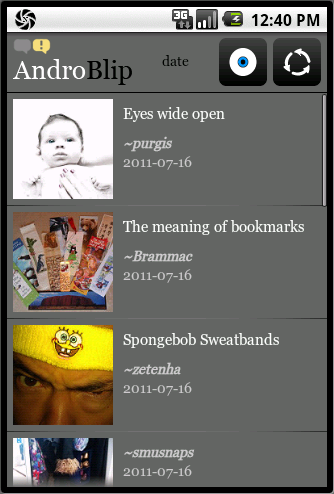
- Support for Large screens sizes
Updates
- We’re now using the blipfoto API version 2.0
Bugfixes
- Removed duplicate newlines in entries.
Have fun with this new release and please drop us a line to let us know what you think of it. If you have any requests for new features or encountered strange behaviour we’d love to hear it!
 Spotted by Ilse and by Ian Wright: uploading with a custom date was broken! A quick fix for this. Get it at the download page!
Changes:
- Fixed the custom date bug.
- A small notice telling you about having no new comments (the older “see comments even when they are not new” feature was removed from the API by blipfoto, so I can’t show those anymore.)


Recent comments